Russell text messages
Russell beta · last updated September 2026
What Russell is
Russell is a personal study assistant for university students. A student signs up for an account, connects their own coursework, and Russell keeps track of their assignments and deadlines. Texting is one optional way Russell reaches the student who asked for it.
How a student opts in
- The student signs in to their own Russell account and opens Settings → Notifications.
- They type their own US mobile number into the “Mobile number” field shown below and tap “Text me a code”. The consent sentence is on the same card: “Get your brief and deadline reminders as a text. We send a 6-digit code to check the number is yours.”
- Russell texts a 6-digit code to that number. The text reads: “Russell: your code is 123456. It expires in 10 minutes. Reply STOP to opt out.”
- The student types the code back into the app within 10 minutes. Only then is the number stored as verified and eligible for messages.
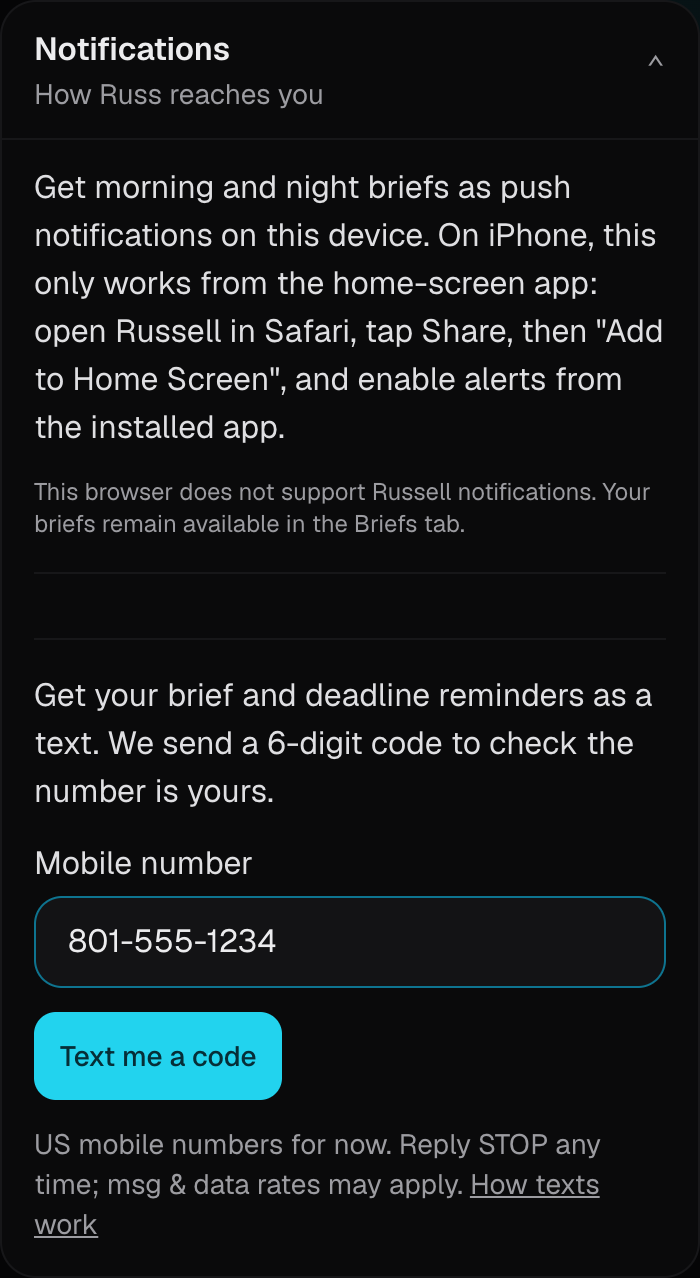
An unverified number never receives a brief or a reminder. The only texts it can receive are the 6-digit code the student just asked for, and the STOP, START or HELP replies Russell is required to send when that number texts one of those words. Russell never texts a number that nobody typed in.
What Russell texts
- A daily study brief: what that student has due and what to start on.
- Reminders for that student's own assignment deadlines.
- Replies to a student who texts Russell (rolling out to a small pilot group first). A student in that group can text Russell a question about their own coursework, or ask Russell to remind them of something, and Russell answers by text. Those replies count against the same daily cap as everything else Russell sends.
- Typically one to three texts a day, and never more than six a day per account — the cap is enforced in the code that sends them, and a reply Russell still owes is counted against it before the reply is written.
- Messages go only to the student whose number it is, and only about that student's own coursework. No marketing, no promotions, no third-party or affiliate content, and nothing about anyone else.
- One mobile number per account. US mobile numbers only.
How to stop
- Reply STOP to any text and Russell stops texting that number. STOP, UNSUBSCRIBE, CANCEL, END and QUIT all work. Russell replies once to confirm: “Russell: you're unsubscribed and won't get texts. Reply START to turn them back on.”
- Reply START to resume. Russell replies: “Russell: texts are back on. Reply STOP to stop them any time.”
- Reply HELP for help. Russell replies: “Russell: your study assistant. Msg&data rates may apply. Reply STOP to stop texts, START to resume. Manage everything in the app.”
- The same student can also turn texts off, or remove their number entirely, from the same Settings → Notifications card.
Message and data rates may apply. Message frequency varies. Answering a text is rolling out to a small pilot group first: a student in that group can text Russell a question and Russell texts the answer back. Outside that group, a text that is not STOP, START or HELP gets no reply at all — those three keywords are the only things Russell answers. If a student in the pilot texts at a moment Russell cannot answer, Russell replies at most once a day to point them back at the app.
Who runs this
Russell is built and operated by Kieran Kilgo, Burlingame, California, as an individual (Russell is the product name). Questions about these messages, or a request to have a number removed, go to politicalpenguin27@gmail.com.
Mobile numbers are stored only to send these messages and are never sold or shared with anyone for marketing. How Russell handles your data.